RCS chats, which replace traditional SMS and MMS messages, are gaining popularity.
RCS chats (Rich Communication Services) are a modern messaging standard replacing SMS/MMS, offering messenger features (dialing indicators, read statuses, high-quality photos/videos, and group chats) directly within the standard messaging app, working over mobile data or Wi-Fi.
The main problem with using SMS Forwarder for such messages is that they aren't registered as SMS messages by the Android OS, so our app can't access them. There are reports online that enabling MMS forwarding in the app sometimes helps; these RCS messages will be forwarded, but the default settings won't.
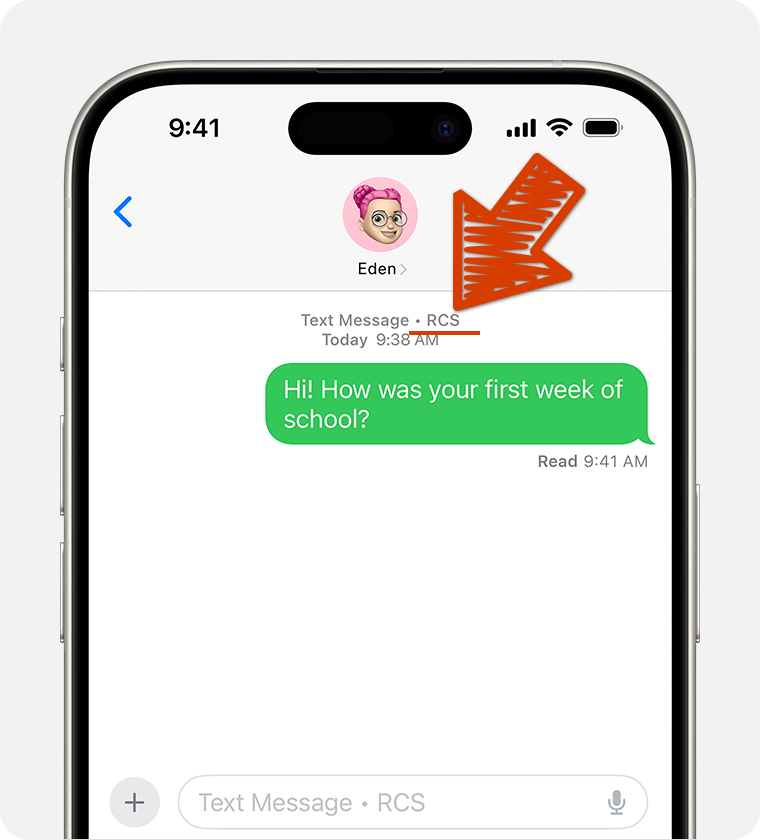
Most often, the message sending window in this app will indicate that RCS messages are used for chat, as in the screenshot:
Unfortunately, we have little programmatic control over these messages, as they aren't considered SMS messages, and our app is primarily designed for forwarding SMS messages. Possible solutions:
- Change your default SMS app (most likely Google Messages or a standard Samsung app) to another one from the Google Play Store.
- Disable RCS chats (instructions for Google Messages).
- Try enabling MMS message forwarding in the app's advanced settings, or accept that these messages won't be forwarded.